

Migrate MS Excel To .NET Web Client
MS Excel offers many powerful capabilities to model and analyze operational and financial data. They are helpful to a power user especially with new features, but tend to become complex and unmanageable over time.
When you have reach the point spreadsheets are out of control, it is time to think about migrating your Excel database application to a Microsoft .NET application. This will provide employees with repeatable business functions that improve the quality and consistency of your business data, and avoid all the control, versions, and security issues and inefficiencies that are required to manage complex sets of business data in MS Excel.
Converting Excel database spreadsheets to an MS .NET application provides a far more repeatable approach to manage business critical processes and data than does an Excel spreadsheet. An MS .NET application supports well-structured and high-quality data. We can migrate your Excel spreadsheets to an MS .NET application, and make your Excel Application more structured, while preserving the original functional integrity of your MS Excel spreadsheet.
Better Data Integrity, Far Less Work
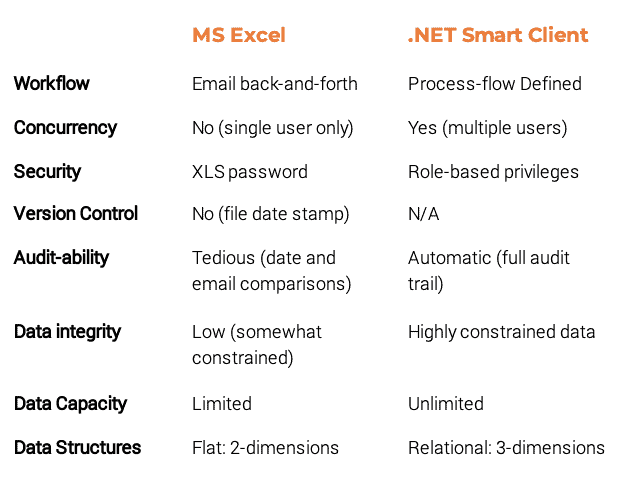
Converting your Excel spreadsheets to an MS .NET application provides a far more repeatable, scalable and secure approach to managing business critical data. Excel spreadsheets provide infinite flexibility, but at the cost of unmanageable data. An MS .NET application enables well-structured, highly constrained data, and a secure, role-based workflow processes. We can migrate your Excel spreadsheets to an MS .NET application, and make your Excel Application more structured, while preserving the original functional integrity of your MS Excel spreadsheet.
MS Excel + .NET Web Client: Highly Compatible
Once an Excel application has been converted from an Excel spreadsheet to an MS .NET application, the data can still be exported, viewed and analyzed in MS Excel. However, the data input, equations, and data manipulation become part of a structured, well-defined database application, which provides for improved data entry consistency, improved versioning as new features get added, and generally easier, more straightforward user interfaces. Best of all, the data can be controlled securely, and made available through role-based security over the Internet as a .NET Smart-Client application.
We frequently design .NET Web-Client applications to import MS Excel data as well. Using standardized MS Excel templates, we can devise a process to gather data in MS Excel spreadsheets, import the data into the MS .NET database application, and make the data automatically available to everyone.