HomeServicesTechnologyClientsCompanyContact Us

Migrating MS Access Applications to Smart Client

The primary reason to migrate an MS Access application to .NET is to provide remote users i.e. work-at-home and field employees the ability to use your MS Access database over the Internet.
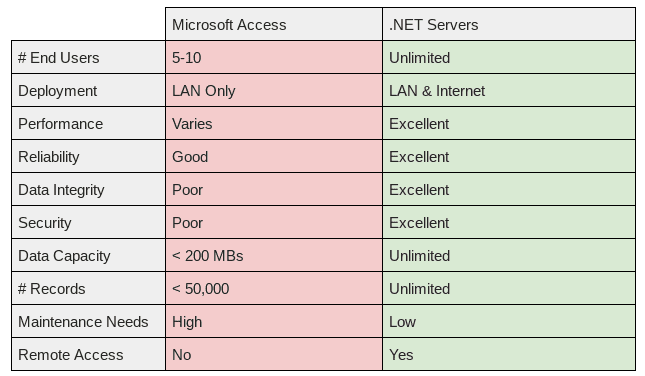
MS Access "out-of-the-box" is designed to support small work groups i.e. 5 - 10 concurrent users on a LAN, where employees typically use the MS Access database over the LAN on a shared network drive. It is also sometimes useful to "split" the MS Access application into two components: the back-end data store and the front-end User Interface.  The back-end data store remains on a shared network drive (or dedicated PC connected to the LAN), and the front-end User Interface is installed on every User's local PC or laptop.  This approach — splitting the MS Access application — distributes the processing power required to run the application, and thus can achieve incremental improvements in MS Access performance and reliability.

MS Access Internet

Many businesses also want to allow external users i.e. work-at-home and field employees the ability to use MS Access remotely over the Internet. This is typically done by setting up a secure VPN connection, in combination with a remote access solution like WebEx, GoToMyPC or Microsoft Terminal Services.  This may work OK for a while, but invariably, users will experience slow-downs in performance (sometimes quite significant!), due to the overhead processing expense associated with "repainting the screen" each time you perform an action.  In fact, MS Access has a built-in performance governor that limits processing to eight (8) concurrent End Users.  MS Access will slow down, incrementally, with each additional user over eight, and there is nothing you can do about this, short of migrating the back-end MS Access data store to MS SQL Server.
Converting the back-end MS Access data store to MS SQL Server will overcome the MS Access data store size and concurrent User performance limitations.  This approach, if properly configured, will also significantly improve data integrity and security, and make the application more stable and reliable. Converting the back-end MS Access data store to MS SQL Server WILL NOT however address remote performance issues associated with WebEx, Terminal Services, etc. "repainting the screen" each time you perform an action in MS Access.  This is because you are still using the native front-end MS Access application interface, which is not designed nor intended by Microsoft for use over the Internet.  

Smart Client = Native Web Interface

If you need to provide work-at-home and field employees the ability to use MS Access remotely over the Internet, you must migrate the front-end MS Access interface to .NET Smart Client, which is a native Internet application interface developed by Microsoft. 

If you are outgrowing MS Access, and have already exhausted all of the work-arounds to providing more LAN and Internet users the ability to use your MS Application, PCA can help you understand what your options are, and the relative cost-benefit of different approaches. Depending upon your situation, we will recommend the most cost-effective approach to "upsize" an existing MS Access application on the Microsoft business platform.  Whether you need to fix problems you are having, or you need to meet more demanding business needs, our experts will work with you to determine the best solution that is compatible with your business objectives, functional needs, and budget.